


 Symbian Anna key features include:
* User interface: Nokia N8, Nokia C7, Nokia C6-01 and Nokia E7 can now sport a fresh, new look with crisp icons and multiple usability enhancements. Typing on the touchscreen is much more easier with a split screen which makes it possible to see message threads, webpages, contacts or email view while typing on the virtual QWERTY keypad - now also available in portrait mode.
* Maps and navigation: Symbian Anna comes with an enhanced Nokia Maps with better search functionality, new public transportation routes and the ability to check-in to favorite geo-social network sites like Facebook, Foursquare and Twitter and so on.
* Browsing: A faster, easier-to-use web browser, delivering quicker page loads and improved device navigation allowing people to connect more easily to their favorite sites on the go.
* Better for business: Symbian Anna brings true business-grade security with improved data encryption on Nokia smartphones. Business users with a Nokia N8, Nokia C7, Nokia C6-01 or Nokia E7 can now easily and securely access their company intranet with IPSEC and SSL VPN enablers.
* Near Field Communications (NFC): The Symbian Anna software update also activates the NFC hardware in the Nokia C7, so people can now simply tap their Nokia C7s together to share contacts, photos, videos and play games; easily pair with NFC-enabled accessories from Nokia and others; and read NFC tags to check-in and more
How To Upgrade From Symbian ^3 To Symbian Anna
If you've read my previous posts on how to flash your a dead nokia phone through USB cable and how to hack symbian phones by flashing with a hacked UDA, this will look very easy.
You need to download these softwares to proceed:
i. Navifirm
ii. Phoenix 2011
Before proceeding, please note:
- Phone battery should be charged
- It is recommended to close all applications on your computer
- You may lose phone warranty by flashing the phone
1. In standby mode, type *#0000# on your phone and note the phone type, eg. RM-XXX
2. Remove your phone battery and note the numbers labeled Code
3. Be sure you're connected to the internet and run Navifirm
4. Under Products, select your phone model. This lists all available firmwares. Click on the latest firware on the list which is should be Symbian Anna.
5. Save the firmware files to your computer. Create a new folder in C:\Program Files\Nokia\Phoenix\Products\RM-XXX
Note that RM-XXX should be replaced by what you saw earlier in Step 1
6. Turn on your mobile phone and connect it through USB in PC Suite/OVI mode.
7. Run Phoenix software as Administrator
8. Select the USB port on which the phone is connected
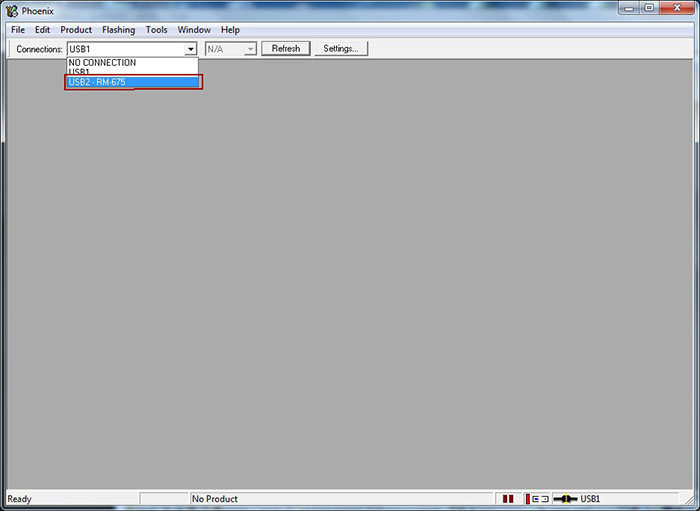
9. Click on File and select Scan Product to read phone information
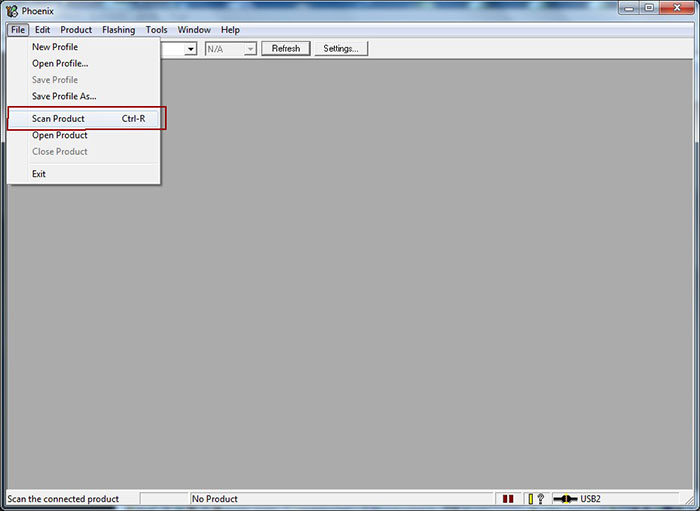
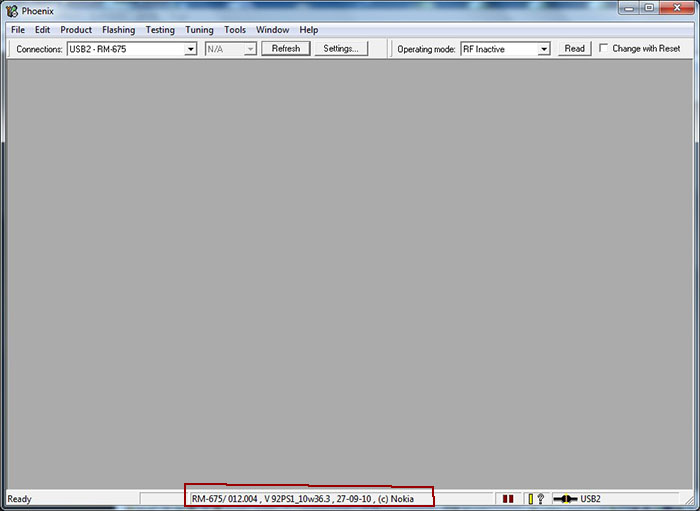
10. Your mobile phone information should be shown as shown below provided there's a working connection between your computer and mobile phone.
11. Click on Flashing and select Firmware Update as shown in the screenshot below
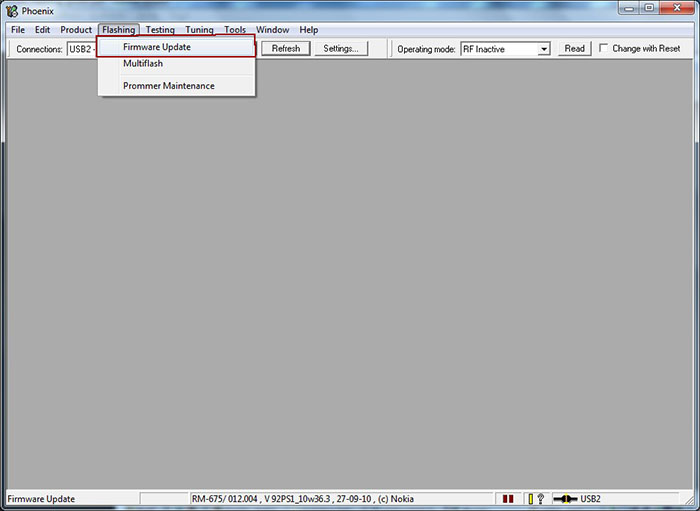
12. If you copied your firmwares to the folder cretaed in step 5, your firware files will be automatically selected.
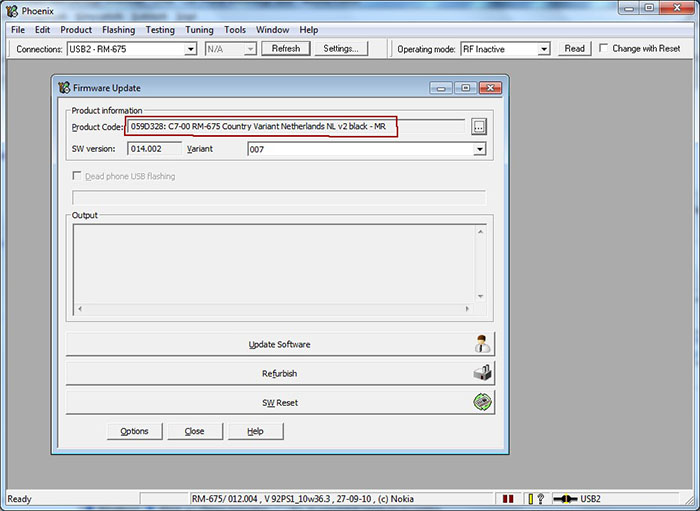
13. Click on Update Software to start the flashing procedure. (You can click on Refurbish button only if you wish to have all user data and applications erased and phone will be reseted to factory settings.) Do not disconnect the mobile phone till the process is fully complete. The operation usually takes 2-3 minutes, when finished, a window will appear: "Firmware updating succeded.".

14. Click OK and remove disconnect your phone from the computer. Turn on the phone and press *#0000# to check out the new firmware.
Updating your Symbian ^3 to Symbian Anna is quite an easy process but there's still that slight possibility of killing your phone through flashing though I've done it a dozen times successfully. Note that you're doing this at your own risk, not mine.
Stay Connected With Free Updates
 |
 |
 |
Subscribe via Email
|


 Don Caprio's just another regular dude, an average person like everybody else and I live in The World's Most Populous Black Nation.
I started blogging late 2009, I'm still loving it and I'm the type of guy that'll love to have my computer inside my coffin when I die.Don't smile, it ain't no joke.
You can add me as friend on
Don Caprio's just another regular dude, an average person like everybody else and I live in The World's Most Populous Black Nation.
I started blogging late 2009, I'm still loving it and I'm the type of guy that'll love to have my computer inside my coffin when I die.Don't smile, it ain't no joke.
You can add me as friend on 
34 comments:
upgraded my nokia E7 to symbian anna successfully. thumbs up
Suly u dont even help we s60v2 user out.Nice tutorial Suly u dont even help we s60v2 user out.Nice tutorial
Hi
I am trying to use flash option but no product code is shown.
I have my files located as C:\Program Files (x86)\Nokia\Phoenix\Products\rm-675
But error saying no product code found help...plz
i cnt do it because for my N8,i cant remove my fone's battery...pls help me...
i cnt do it because for my N8,i cant remove my fone's battery...pls help me...
you can also press *#0000# to get the product code
There's no matching product code for my blue E7, will any of these work, or do I need to wait for one to match? My code is 059F6L8, closest I can imagine is the blue UK, 059H471. Any ideas?
*product code in Navifirm under variants, that is. Thanks!
You can use a different product code. But be careful about the one you select cuz i think it affects the language pack installed
CAN I SELECT RM-594 INSTEAD OF RM-588 ?????
actualy it is RM-588
No you can't. it might kill our phone
If i flash this into my nokia n8 will i be able to sync my phone to my computer using ovi suite, photos, apps and all with no problems?
Yeah, so far the flashing process got completed.
can I use win xp to do this?
Sure, you can do it on Windows XP.
Hi,
can i update my Nokia c5-03 to Symbian Anna.
Thanks
order valium buy roche valium no prescription - valium dosage in dentistry
diazepam without a prescription diazepam mylan - side effects of diazepam suppositories
buy ambien long does ambien 10 mg take work - ambien side effects diarrhea
xanax generic xanax ambien alcohol interaction - generic xanax 3mg pills
buy zolpidem online zolpidem tartrate zoloft - zolpidem er a116
diazepam 5mg diazepam valium dosage - diazepam withdrawal muscle pain
xanax anxiety xanax 84 - best way order xanax online
buy diazepam online buy very cheap diazepam - diazepam 5mg dentist
discount ativan ativan uses - lorazepam 1 mg pregnancy
buy alprazolam online no prescription xanax effects fetus - xanax class 2 drug
xanax online xanax withdrawal wikipedia - xanax generic mg
generic ativan ativan side effects twitching - ativan side effects skin
buy carisoprodol online carisoprodol dosage back pain - carisoprodol naproxen
carisoprodol order soma ship texas - buy soma no rx
valium for sale no prescription buy valium online overnight delivery uk - valium pills india
buy valium online 5mg valium compared to klonopin - valium treat anxiety
carisoprodol no prescription soma intimates online code - buy somatropin in mexico
ambien ambien side effects hair loss - ambien cr and pregnancy
buy valium no prescription is it illegal to order valium online - shooting valium pill
Post a Comment