Showing posts with label Symbian. Show all posts

October 27, 2011

Mobile Documents - Email Client For Symbian & Android

Viewing your emails on mobile phone with your native browser or default email application isn't always the best mobile messaging experience as you might not be able to do certain things unless you get back to your computer. Mobile Documents solves this by giving you that desktop experience, allowing you to do everything you want to do with your emails. Emails are pushed to your phone instantly just like you're receiving text messages on your phone.

With Mobile Documents, handling emails on your Android or Symbian device gets a lot better as you can even receive large emails, view them on your phone, view attachments and at no extra cost. With Mobile Documents cloud-boosted push email, you get to save time, bandwidth and roaming cost. It's the best email client I've used on my symbian phone so far.


Below are the five reasons why you should use Mobile Documents email client on your mobile phone:

1. Better. Because you now only have one single feature to manage your attachments - download. You wait to receive, forward and send heavy emails - and pay. At best you can open a heavy image, PDF or Office document.

2. Instant. Your documents are streamed. No waiting. Heavy stuff becomes light as feathers. View and read without any download. Digest and act instantly with high-quality responses. At ease, add any attachment.

3. Secure. No download means no sensitive documents on your device that can get lost, or stolen. Strong encryption secures your connection and protects your email and documents integrity.

4. Easier. Single clicks get stuff done. As one beta tester expressed it, » I just wish email was just as easy on my PC. «

5. Nicer. Well, thumbnails, previews, page flickering, zooming, viewing and reading - all served to your finger-tips at will - offers an entirely new and much richer experience. Mobile Documents brings the desktop experience to the mobile.

Mobile Documents is still in the beta stage but that doesn't imply that it's got any major bug. I've been using it for quite for some time on my Symbian device and it's quite great. I haven't tested it on any Android smartphone yet but I guess it should work great as well. Mobile Documents supports Symbian ^1, Symbian ^3, S60 3rd Edt. FP1 Edition and later. It's got a notification widget that displays at the homescreen to notify you of incoming mails.

Download Mobile Document from OVI
(symbian)

Download Mobile Document from Android Market (Android)

October 12, 2011

Top Ten Best Symbian Phones 2011

With strong competition from HTC, Sony Ericsson, LG and other prominent phone manufacturing companies rolling out different Android smartphones, Nokia responded by upgrading the symbian operating system which was almost swallowed with the evolution of Android OS. One would have thought symbian operating system development would stop at series 60 3rd edition but the birth of Symbian ^3, Symbian Anna, Symbian Belle and Maemo OS proved that wrong. Though Nokia keeps releasing new phones every now and then, these are the ten best Nokia symbian phones I would recommend to anyone as of now, ranging from cheap, affordable ones like Nokia C6 to very expensive symbian devices like Nokia Oro. Please note that prices always change and the prices provided in this list may no longer be accurate by the time you're reading.

1. Nokia C6


Nokia C6 looks like an upgraded version of Nokia N97 with almost the same screen size and qwerty keyboard but unlike N97, it goes straight out flat when slid open. It's not the best when compared to high end symbian Anna smartphones and not that costly like the newest set of Symbian phones in market but it sure does a lot even with it's price. Nokia C6 comes with Symbian OS v9.4, Series 60 rel. 5 (S60V5). It has Yahoo! Messenger, Google Talk, Windows Live Messenger pre-installed and has dual camera with the primary one being a 5MP,auto-focus focus camera with LED flash. Nokia C6 has 434 MHz ARM 11 processor and supports up to 16GB of external memory. The price is around $250.

2. Nokia C6-01


This is an improved version of Nokia C6 as the name suggests. Nokia C6-01 has much more features compared to Nokia C6 as it comes with Symbian ^3 operating system which can be upgraded to Symbian Anna. It has an internal memory of 340 MB, 256 MB RAM and 1GB ROM. Nokia C6-01 has a Micro SD card slot and supports up to 32GB. One of the lovely features is it's scratch resistant Gorilla glass display and unlike Nokia C6, it has a 8 MP, 3264x2448 pixels, fixed focus camera with dual-LED flash. It costs a bit more than Nokia C6, a difference of just $20 last time I checked.

3. Nokia 500

Nokia 500, released September 2011, is one the the latest Symbian Anna phones out there. It comes with a 1GHz ARM 11 processor and 256 RAM and users are quite delighted with the speed. Nokia 500 has just one camera (5 MP).

4. Nokia C7
Nokia C7 is another Symbian ^3 phone that can be upgraded to symbian Anna OS with a design that makes it stand out and exciting features like face detection. It has two cameras with the primary one being a 8 MP, 3264x2448 pixels, fixed focus, dual-LED flash camera. Nokia C7 has 680 MHz ARM 11 processor, 256 RAM, 8GB storage and has a micro SD slot that supports up to 32GB. The display looks like gorilla glass display and of course, scratch-resistant. The price is about $320.

5. Nokia X7


Nokia X7 is yet another classically designed, Symbian Anna powered Nokia smartphone released June 2011. It features a sleek look with a silver side panel that makes it just beautiful. Nokia X7-00 has a random access memory of 256MB with an internal mass memory of 8GB but supports up to 32GB of external memory (micro SD). It has a 680 MHz ARM 11 processor with a 1GB ROM. It has a single 8 MP, 3264x2448 pixels, fixed focus, dual-LED flash camera. You'll love Nokia X7-00 if you love flashy things. The price is around $450.

6. Nokia N8


The popular Nokia N8 is one of the first Nokia Symbian ^3 OS phones released October 2010. The OS is upgradeable to Symbian Anna and has a 680 MHz ARM 11 processor. Compared to Nokia X7-00 and Nokia C7, Nokia N8 has a rather simple look but it's functionality isn't bad at all. It has an internal memory of 16GB and supports up to 32GB external memory (micro SD). Nokia N8 has a TV-out (720p video) via HDMI with Dolby Digital Plus sound and sports a cool, anodized aluminum casing. It has a 12 MP, 4000x3000 pixels, Carl Zeiss optics, camera with autofocus. It price is around $420

7. Nokia E6

Nokia E6 is a powerful phone on it's own though it looks different from most of the ones above and reminds one of Nokia E63. If you're not quite convenient with touch qwerty keypad, then this phone running Symbian OS will meet your need. It has stainless steel panel and comes in three main colours: black, white, and silver. Nokia E6 has a 680 MHz ARM 11 processor, 8 GB mass memory, 256 RAM and a 8 MP, 3264x2448 pixels, fixed focus camera with dual-LED flash. A business phone with QuickOffice document editor (Word, Excel, PowerPoint, PDF). The price is about $380.

8. Nokia Oro
Nokia Oro was released just last month and the phone is exotic and crazy. It's a renewed version of Nokia C7 made of 18-carat gold plating, sapphire crystal and leather materials. You don't expect that to come cheap, do you? It costs $1,500 and it's worth it, I guess. Nokia Oro comes with Symbian Anna OS.

9. Nokia E7

Nokia E7 looks a lot like Nokia N8 but it's qwerty keyboard makes it different. This classy Symbian ^3 phone is one of those phones I call complete smartphones. Just like Noka N8, it can be upgraded to Symbian Anna and has almost the same specifications but with a little differene. It has a two cameras,the primary being a 8 MP, 3264x2448 pixels, fixed focus camera with dual-LED flash. The current price is around $470.

10. Nokia N701

Noka 701 is a high-end Symbian Belle smartphone with very tight specifications. It has a random access memory (RAM) of 512 MB, 1 GB processor and 1 GB ROM. Nokia 701 has an internal memory of 8GB, dual camera with the primary one being a 8 MP, 3264x2448 pixels, fixed focus camera with dual-LED flash. This phone was released September 2011 and presently costs $425.

October 8, 2011

Facebook Client Application For Symbian Phones

Keeping in touch with your facebook friends on your symbian smartphone is much more convenient using a facebook client. There are quite lots of symbian facebook client applications like gravity and the rest of them but the one I prefer most is fMobi. fMobi is built with the all the new facebook upgrades included. The most recent release now feature places and check in features.

Fmobi's key feautures include:

* News feed
* Chat
* Profile
* User info
* Messages
* Check In / Places
* Sound notifications
* Vibration notifications
* Top Friends
* Search
* Multiple settings
* Photo Upload
* Groups
* Pages
* Events
* Commenting / Liking
* View comments / likes
* Albums / Photos
* Notifications
* Landscape / Portrait
* Black / White theme

It works on Symbian Belle, Symbian Anna, Symbian ^3, Symbian ^1, Symbian S60V5 and there's a version that works on Maemo OS as well. I haven't yet tested it on a Symbian S60V3 device but it works quite smoothly on Nokia N8, Nokia N97, Nokia E7, Nokia C6 and some others.

Download for Symbian^3 / Anna / Belle & Symbian^1 (Symbian 5th ed) (v2.0):
Download fMobi from OVI Store

Download for Maemo (v1.4):


It's one of the best symbian facebook clients I've ever come across and I guess you should check it out.

October 2, 2011

Symbian Hack With DrWeb AV Security Hole & Norton

Since OPDA stopped issuing certificate and key to sign symbian applications, several ways emerged to hack symbian phones. You can hack your symbian phone permanently using a cooked firmware or the last one I posted a week ago which works on Nokia and Sony Ericsson phones as well. This post comprises of two different symbian hack method without the need for key and certificate. You don't need to flash your phone too as the whole operation will be carried out on your phone.

I have to commend Coderus for this methods though. It's not my original work, just sharing with you. If one method doesn't work for you, i suggest you try the other one.

1. DrWeb AV Security Hole

i. To access private folders, you need to connect your phone to PC or insert your memory card to a card reader.
-If you're going to use E:\ (mass storage, or memory card in devices without mass storage memory), download QuarantineDriversLDD.zip
-If you'll be using F:\ (memory card in devices with mass storage memory), you should download QuaranineF.zip

ii. Depending on the one you downloaded, unpack the archive to the chosen drive

iii. Download and install DrWeb6 for symbian

iv. Launch DrWeb and go to Options > Quarantine


v. Go to Options > Select All

vi. Go Options > Restore. RomPacther drivers now in C:\sys\bin directory

vii. Download and install RomPacther+ 3.1 Lite

viii. Launch RomPatcher+ and apply Open4all patch. This gives you have access to write in all system folders. Apply Install server patch. This allows you to install unsigned applications without certificate restrictions.

ix. If you're using Symbian ^3, copy this install server yo C:\sys\bin

x. If you still get the red cross showing and can't install unsigned applications, try the install servers on this post.


2. Norton Security Symbian Hack

i. Download NortonHack.zip

ii. Install NortonSymbianHack.sisx and launch

iii. Go Options > Anti-Virus > Quarantine list

iv. Next, go to Options > Restore and accept prompt

v. Exit application and delete from Application manager (Symantec Symbian Hack). Also delete C:\shared\ directory

vi. Install RomPatcherPlus_3.1.sisx from hack archive

vii. Launch and apply the following patches:
- Open4all for full access to file system including system folders
- Installserver for installing any unsigned applications. If you get a red cross showing, get the right install server from this post.
-Set patches to auto if needed (Options > Add to auto)

I'm sure either of these methods will work for you. If one isn't working properly, you should perform a hard rest or restore factory settings and try the other one. Share the post if you find it helpful.

September 22, 2011

Easy Way To Hack Your Nokia Or Sony Ericsson Symbian Phone Without Flashing

I wrote a post on permanent hacking for symbian phones some weeks back but some complained the method is quite complex and the process was just too risky and complicated. Also it worked only on Nokia phones only and you definitely need a PC to do it. The method I'll be posting today is quite easy and you can hack your symbian Nokia or Sony Ericsson phone without a computer, a developer key and certificate. The method was tested on Nokia C-7, Nokia N8, Sony Ericsson Vivaz, Satio and a host of other symbian phones ranging from symbian ^3, symbian anna, symbian s60v5 and s60v3. Now it's possible to hack your symbian phone without a necessarily flashing the phone.

You can't fully utilize the power of your Symbian smartphone if the phone isn't hacked yet. Hacking your phone allows you to install unsigned applications and applicatios with expired certificates. You can easily bypass installation error messages such as "certificate error," "certificate expired" and so on.

Unlike the method I posted earlier, you have to perform this symbian hack on your mobile phone and ther's absolutely no need for a computer. First download these files:

UMUNokiaHack.sisx
UMUNokiaHack.sisx

UMUSonyEricssonHack.sisx

RomPatcherPlus_3.1.sisx

RomPatcherPlus_3.1.sisx

InstallServers_Pack.Zip
InstallServers_Pack.zip

X-plore_s60_3rd_1_53.sisx
x-plore_s60_3rd_1_53.sisx

1. Depending on whether you're using a Nokia or Sony ericsson symbian phone, download UMUNokiaHack or UMUSonyEricsson Hack and install. Launch the application

2. Select your desired connection. Here you can select wi-fi or your default access point

3. Accept the trial key and accept the trial license too

4. Select Yes

5. Next, select No, then OK

6. Select OK and press 123. Now re-type 123 once more

7. Choose Options and click on Antivirus

8. Go to Quarantine

9. Press Options > Restore > Yes

10. Click Back, Home, then Exit and uninstall UMU Mobile Security immediately.

11. Enter 123 when prompted.

12. Now install RomPatcherPlus_3.1.sisx

14. Launch it and apply Open4All. This gives you access to all folders including system folders

15. Apply Installserver. Now you can install all unsigned applications.

NOTE: If you see something like a red cross, then you still have one more thing to do. There's a link to installservers pack earlier in this post and this is where to use it.

To know which installserver to use, you need to know your phone's operating system. Go to www.gsmarena.com and run a search for your phone to know the operating system and other details. Below is just an overview of what the installservers pack contain and corresponding phones they work for.

by swmail:

installserver91: for E60, E61i, E62, E65, E70, N71, N73, N75, N77, N80, N91, N91, N92(Symbian 9.1)
installserver92: for E51, E90, N76, N81, N81 8GB, N82, N93, N93i, N95, N95-2, 6290, 5700, 6120, 6110, i520, i550, i400, i450, i560, G810, N78, N96, 6220(Symbian 9.2, 9.3)
installserver3250: for 3250
installserver5500: for 5500
installservere50: for E50
installservere61: for Е61 or 3250 (if first file wont work only)

by PNHT:
installserver934: for newest 9.3 and all 9.4 models

by CODeRUS:
installserverS3: for all Symbian^3 (and Symbian Anna, Symbian Belle)


* Check the installsever compatible with your phone

* With X-plore or any other file manager you have, copy the installserver to to C:\sys\bin

* There's no need to apply installserver patch in RomPatcher and your phone is now hacked.

This hack works on symbian Anna, symbian ^3, symbian s60v5 and probably s60v3. It works on Sony Ericsson Vivaz as well and I've read reports that it also works on Satio too.

All credits to Coderus for sharing this easy approach to symbian hacking.
Consider sharing the post as well if it helps!.

September 16, 2011

How To Upgrade Symbian ^3 To Symbian Anna OS

Now you can upgrade you Nokia E7, N8, C6-01 or C7 running Symbian ^3 operating system to the much better Symbian Anna without losing your personal files and customizations. Updating your Symbian ^3 firmware to Symbian Anna enhances your experience with your mobile with a much improved user interface. Now you can get a virtual keyboard in portrait mode, enhanced Nokia maps, better web browsing and web security among other improvements.

Symbian Anna key features include:

* User interface: Nokia N8, Nokia C7, Nokia C6-01 and Nokia E7 can now sport a fresh, new look with crisp icons and multiple usability enhancements. Typing on the touchscreen is much more easier with a split screen which makes it possible to see message threads, webpages, contacts or email view while typing on the virtual QWERTY keypad - now also available in portrait mode.

* Maps and navigation: Symbian Anna comes with an enhanced Nokia Maps with better search functionality, new public transportation routes and the ability to check-in to favorite geo-social network sites like Facebook, Foursquare and Twitter and so on.

* Browsing: A faster, easier-to-use web browser, delivering quicker page loads and improved device navigation allowing people to connect more easily to their favorite sites on the go.

* Better for business: Symbian Anna brings true business-grade security with improved data encryption on Nokia smartphones. Business users with a Nokia N8, Nokia C7, Nokia C6-01 or Nokia E7 can now easily and securely access their company intranet with IPSEC and SSL VPN enablers.

* Near Field Communications (NFC): The Symbian Anna software update also activates the NFC hardware in the Nokia C7, so people can now simply tap their Nokia C7s together to share contacts, photos, videos and play games; easily pair with NFC-enabled accessories from Nokia and others; and read NFC tags to check-in and more

How To Upgrade From Symbian ^3 To Symbian Anna

If you've read my previous posts on how to flash your a dead nokia phone through USB cable and how to hack symbian phones by flashing with a hacked UDA, this will look very easy.

You need to download these softwares to proceed:

i. Navifirm
ii. Phoenix 2011

Before proceeding, please note:

- Phone battery should be charged
- It is recommended to close all applications on your computer
- You may lose phone warranty by flashing the phone

1. In standby mode, type *#0000# on your phone and note the phone type, eg. RM-XXX

2. Remove your phone battery and note the numbers labeled Code

3. Be sure you're connected to the internet and run Navifirm

4. Under Products, select your phone model. This lists all available firmwares. Click on the latest firware on the list which is should be Symbian Anna.

5. Save the firmware files to your computer. Create a new folder in C:\Program Files\Nokia\Phoenix\Products\RM-XXX

Note that RM-XXX should be replaced by what you saw earlier in Step 1

6. Turn on your mobile phone and connect it through USB in PC Suite/OVI mode.

7. Run Phoenix software as Administrator

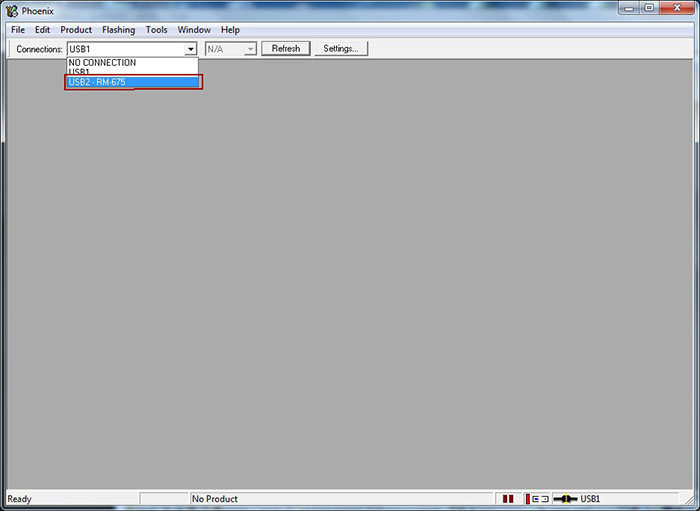
8. Select the USB port on which the phone is connected


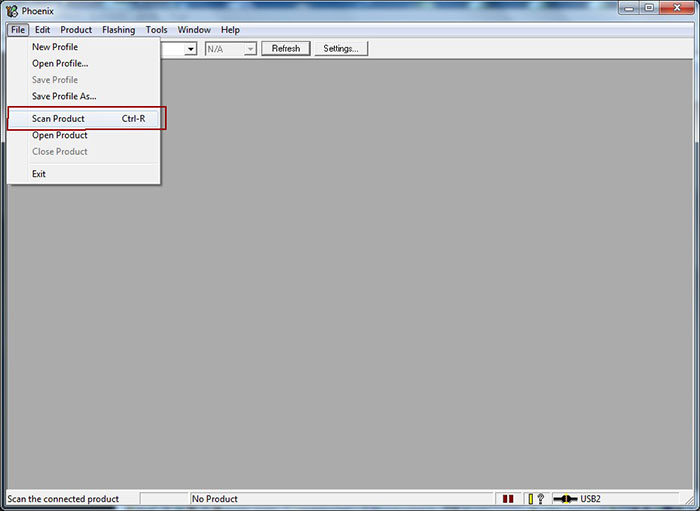
9. Click on File and select Scan Product to read phone information


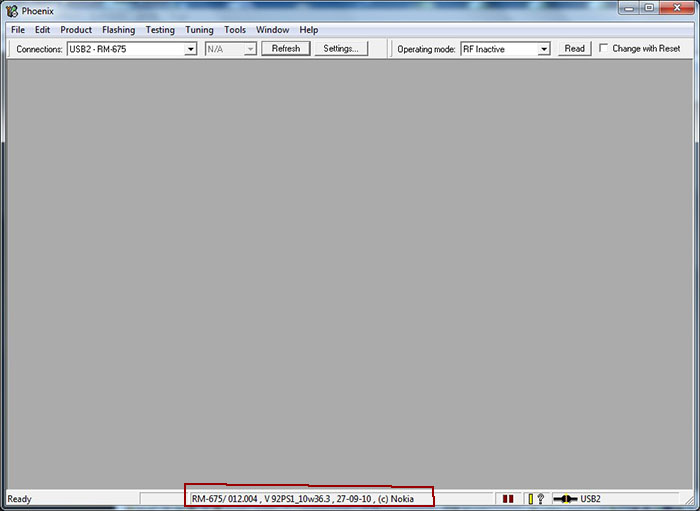
10. Your mobile phone information should be shown as shown below provided there's a working connection between your computer and mobile phone.


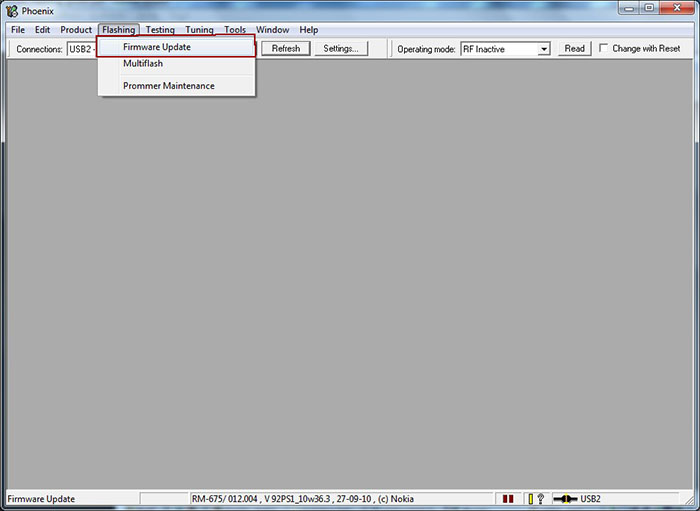
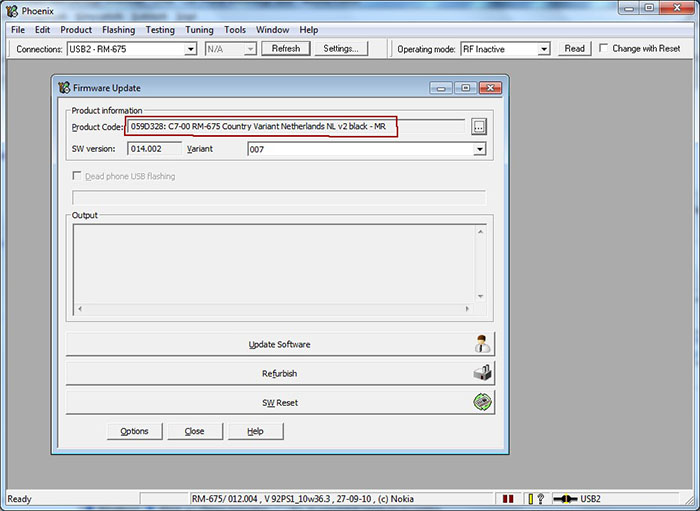
11. Click on Flashing and select Firmware Update as shown in the screenshot below


12. If you copied your firmwares to the folder cretaed in step 5, your firware files will be automatically selected.


13. Click on Update Software to start the flashing procedure. (You can click on Refurbish button only if you wish to have all user data and applications erased and phone will be reseted to factory settings.) Do not disconnect the mobile phone till the process is fully complete. The operation usually takes 2-3 minutes, when finished, a window will appear: "Firmware updating succeded.".

Flashing with Phoenix 07.jpg

14. Click OK and remove disconnect your phone from the computer. Turn on the phone and press *#0000# to check out the new firmware.


Updating your Symbian ^3 to Symbian Anna is quite an easy process but there's still that slight possibility of killing your phone through flashing though I've done it a dozen times successfully. Note that you're doing this at your own risk, not mine.

September 8, 2011

How To Block 'Flashers' And Unwanted Phone Calls

It can be annoying receiving persistent calls you have no intention of picking up. Are you getting incessant spam calls (commonly called 'flashing' here in Nigeria) from a crazy individual or your ex keeps bugging you with abusive calls? Sometimes you might just feel like taking a break and receiving phone calls from certain people might spoil the moment.

Easy Busy is a symbian application that simply blocks calls from people you don't want to talk to. When enabled, the caller gets a busy tone without you needing to push the red button. It sends a busy signal even before your phone rings. You can add as much numbers as you like and it's quite easy to use as you can add numbers directly from your phonebook or manually.


Easy Busy has a simple user interface and keeps those annoying calls off. Just download, install, add the numbers you want to block and they keep getting a busy tone while you enjoy your break. Easy Busy can also auto start so you won't need to launch the application each time you switch your phone off and back on. It automatically starts blocking those annoying calls. With easy busy, it's easy to tell them your line is busy!

Download Easy Busy from Capriofiles

Download Easy Busy from Hotfile

Note that the application is unsigned and you need to sign them or hack your phone. It's compatible with symbian s60v3, s60v5 and symbian ^3. It should work on symbian Anna as well

August 26, 2011

Hack Symbian Phones ( S60V3, S60V5, ^3 and Anna ) Without Cert And Key

(Update - if you think this post is too complicated, try the new, easier one)
Firstly, all credit goes to Sdomermpc for this useful tutorial & Whalesplaho for editing the tutorial, making it easier to understand and adding the download links to all needed tools. As of June 2011, the only known method of hacking a symbian phone is by using a cooked firmware. There are several methods on the internet about hacking symbian phones without key and certificate but most of these methods only work for S60V3 and some S60V5 symbian phones. The method in this tutorial can hack any phone using symbian operating system ranging from S60V3, S60V5, Symbian ^3 and Symbian Anna. This hacking is permanent as you have to customize your own hacked firmware and your phone will still remain hacked even if your restore factory settings a thousand times over.

There was a previous post I made on using free signer to sign your symbian applications but this is now practically useless as OPDA and other symbian certificate and key issuing sites are no longer working. Also if you are using a S60V3 phone with operating system 9.1, I suggest you check this post on using Quick Hack Kit instead of going through this.

To hack your symbian phone without certificate and key, you need to have the following tools:

1. Nokia OVI Suite or Nokia PC Suite

2. Installservers for Symbian OS 9.1, 9.2, 9.3 & 9.4

3. NavifirmPlus - this is used to download original nokia firmwares.

3. Nokia Cooker - for creating hacked UDA.

4. Phoenix Service Suite - for flashing symbian phones through USB cable as earlier posted here.

5. NFE Core 2 - - for packing & repacking rofs/core.

6. Rompatcher plus - for applying useful patches.

7. For Cooker Files

Instead of downloading the files separately, you can download Required Tools.rar (97MB) which has NavifirmPlus, NokiaCooker, NFE Core 2 and Phoenix Service Suite Included.

Now follow the steps carefully

1. In standby mode press *#0000# and note your phone type, eg. RM-419

2. Remove the battery and check the back of the phone to know the product code labelled with the term CODE

3. With a steady internet connection, open NavifirmPlus

4. Search for the product [RM-xxx] that matches your phone model.

5.Now select the firmware version and download the firmware in accordance with the product code of your mobile to your computer.


Note: The files you just downloaded are the original firmware files of your phone and you should back them up so you can flash your phone with these files in case something goes wrong though I'm sure it shouldn't.

6. Launch NFE Core 2 then Click on Open


7. Select the file with this extension rmXXX_XXX.XXX_prd.core.fpsx then click Open


8. Check Keep the oldCRC32 & click Unpack


9. Click Yes on the dialogue box that pops up.


10. When it shows Unpack Complete, click on ROFS Callibration


11. The ROFS Calibration should be done as seen in the screenshots below:


12. Repack as shown below


13. After the ROFS file is created, exit the program.


That looks like the first phase of the whole process, now let's proceed.

14. Open Nokia Cooker v1.1. (Backdate your PC, I backdated mine to the current date & month and set the year to 2000. You should do this else it will show a message that says the program is outdated)


15. Click on Open Firmware, then go to the location of the downloaded firmware files and open a file with an extension that looks like “prd.rofs2.fpsx”. Now you should be able to see some folders inside Nokia Cooker Window.


15. Replace the folders as seen in the screenshoot below. [Open the Tools Folder- Open For Cookers Folder then drag the four folders & replace with the ones in NokiaCooker]!!! When i tried replacing, no action was made so i opened each folder & did the same to the ones in For Cookers Folder. I then started doing it one by one [e.g. On Nokia Cooker, Click on SYS Folder, Click on BIN Folder then it displays what is inside BIN Folder on the right side of the window, now open For Cookers Folder, Open SYS Folder, Open Bin Folder, Drag all tha files inside to NokiaCooker (the Bin Folder Open). Do the same for all other Folders & Files too.... After Dragging & Dropping, Drag and Drop Installserver.exe compatible with your phone to SYS\BIN Folder [Open the Installserver Folder & Select the one compatible with your phone then drag it to Sys/Bin Folder]. I used OS 9.3/9.4 because my phone is an FP2 device!

NOTE:- FP1 devices uses OS 9.2 why Pre-FP1 devices uses OS 9.1. All S60v5 or ^1 devices uses OS 9.4 & the Latest OS which is ^3 & Anna uses ^3!!! To get your OS type, goto http://www.gsmarena.com, type your phone model in the search box located at the top right corner and click on Go. When it shows the device INFO, scroll down to OS Label & check.


16. You just created a hacked UDA which will be used to flash your symbian smartphone.


17. Copy all the firmware files except the one just created taggged BACKUP to C:\Program Files\Nokia\Phoenix\Products\RM-XXX. You should create the RM-XXX folder according to your phone type.

18. Connect your phone using your USB cable in PC Suite Mode

19. Open Phoenix Suite

20. The Phoenix Suite will recognize your phone's RM code with the corresponding USB Port.

21. Now go to File and Select “Scan Product”.
Your phone's RM code, firmware version and other information will now be displayed at the bottom of the phoenix window.


22. Make sure that the Operating Mode is set to Normal.

23. Now on the menu bar, go to “Flashing” and Select “Firmware Update"


24. A new pop up window will open inside the phoenix suite which will show you the Product Code, Software version and variant version.

25. Now select refurbish to start the flashing process.


26. The last stage.


27. Disconnect your USB Cable,

- Go to Installation

- Launch Rompatcher [this hack method has rompatcher embedded along with the hacked UDA so there's no need to install rompatcher]

- Apply the open4all patch & press Options, then select Add to Auto for accessing system folders.

- Apply the open4all patch & Press Options then Select Add to Auto for installing any unsigned/signed apps in your hacked symbian operating system.

28. Install X-plore

-Launch X-plore

-Press Menu > Tools > Configuration

-Tick all the boxes but the image & font boxes are optional

-Click Back

-Goto C:\ & Open

You should see patches folder there, just scroll to the folder and press Menu - Scroll down to Edit then click on Move & move is to E:\

This symbian operating system hack method works on Symbian S60V3, S60V5, ^3 & Anna. Enjoy your hacked smartphone and leave a comment below. All credit goes to Sdomermpc for the tutorial and Whalesplaho who brought it to www.9jaclub.com and giving the download links plus editing the text and making the whole process more explicit. If you have any problem trying to make this work, there's an active thread on our web forum where this topic is being discussed.

August 13, 2011

Ping On Android, iPhone, Nokia S40 and S60 Like Blackberry

One of the key features of BlackBerrry phones which other smartphones lack is the ability to ping other BlackBerry phones. A BlackBerry ping is but one way to get another BlackBerry owner's attention, this allows two BlackBerry owners to communicate instantly like instant messenger on your computer. WhatsApp is a cross platform application that makes this exclusive BlackBerrry feature available on other smartphones like Android, iPhone, Symbian S60V3, S60V5, Symbian ^3 and Symbian Anna! And just of recent, WhatsApp developers released a beta version for Nokia S40 phones.


With WhatsApp, you can send unlimited pings to friends you have using WhatsApp Messenger. It uses your internet data plan, the data transfer is almost negligible and it's more or less sending unlimited free text messages.


Because WhatsApp Messenger uses the same internet data plan that you use for email and web browsing, there is no cost to send messages and stay in touch with your friends and family. Apart from basic messaging, iPhone, Android, Nokia and BlackBerry WhatsApp Messenger users can send each other unlimited images, video and audio media messages.

Unlike BlackBerry messenger, you can ping other users using different mobile devices and your PIN is simply your phone number.

Download WhatsApp for Android OS

Download WhatsApp for Symbian OS

Download WhatsApp for Nokia S40

Download WhatsApp for BlackbBerry

Download WhatsApp for iPhone

August 12, 2011

Image Editor For Symbian S60V3, S60V5 And Symbian ^3

Most Nokia phones come with a basic image editor but certain phones like Nokia E65 lack this feature. The default symbian image editor is also limited in terms of features. iDesigner is an advanced image editor for symbian OS 9.x with lots of features found in popular image editing softwares like Adobe Photoshop. iDesigner requires python runtime installed on your symbian device for proper functioning.


Features include:

-Work with the png or jpg formats

-Ability to work with multiple images simultaneously

-Work with / between the images via the clipboard: isolation, cut, copy, paste from the clipboard (just inside the program)

-Tools: pencil, eraser, line, rectangle, ellipse, polyline, polygon, fill, spray, text, eyedropper, magnifier, selection, pattern brushes

-Convert images: rotation, mirroring, resizing, resize the canvas, cut selected, invert colors, the transformation into a mask, replacement of color, saturation, sepia, lighting, shading, blur, gradient, posterization, gradient, rgb balance

-Undo, redo actions

-Exporting, importing palette of colors

-Easel for color matching.


Download ImageDesigner.v1.40.RC3.S60v3.SymbianOS.x.Unsigned.zip From Capriofiles


Download ImageDesigner.v1.40.RC3.S60v3.SymbianOS.x.Unsigned.zip From Hotfile

May 5, 2011

Cheexy 1.35 - The S60V3 Proxy Tunnelling App

Cheexy is a proxy tunelling application specifically built for Symbian S60V3 devices. It's a python based mobile application that works like tunneling applications for windows such as Your-Freedom, India Web Proxy, etc. It's configuration is somehow similar to the popular handler applications but with some modifications.

Requirement
Cheexy 1.35 requires python runtime. Click here to read about python and download.


How to use Cheexy

To make Cheexy act as a localhost for your mobile applications
* Create a new access point named CHEEXY APN or MTN CHEEXY depening on your choice using your default operator access point. IP should be 127.0.0.1 and port should be 123
* Open Cheexy and configure HTTP Proxy host and port as shown below


* There's also an option to add a tunnel proxy. Also select the access point you created earlier as your default access point.


You might as well go to tweaks under settings and add a url suffix/front query


If well configured, Cheexy can be a powerful free browsing tools to those who are accustomed with YK Handler mods.

Drawback
* Only works with http protocol(POST and GET)
* Http POST limited to amount of free ram
* Only works with apps that can use http proxy e.g: s60 browser
* Only 1 connection at a time
* Ram usage tend to grow rapidly when downloading large file. Maybe there’s a leak somewhere (Suspecting conn.recv @ get_online)

Changelog
v1.35

* New: Tunneling option to tunnel request to a proxy server through user proxy server (or server if http/mms proxy is not set)
* New: Option “Save log” will read log in ram and save it.Previously, “Save log” will read log in console output and save it
* New: Option “Clear log” will only clear log saved in ram, while “Clear screen” will only clear log on screen without clearing log in ram.
* New: Dynamic header changer.Change any header without restricted to inbuilt settings.See Option Guides and HTTP Headers option for more info
* Changed: log now have 4 modes instead of 2.See Settings>General for more info
* Changed: Some options name changed:
* http_proxy to http_proxy_host
* http_port to http_proxy_port
* mms_proxy to mms_proxy_host
* mms_port to mms_proxy_port
* log to log_mode
* Removed: accept, accept_charset, accept_encoding, referer option in settings removed

v1.25
* Urgent fix for v1.2
* Fix default.py that cannot detect cheexy.pyc.(S60v3)
* Removed unecessary hex+symbol (for now) in hex_sym function.Now some(or all?) url with hex codes in it may work properly.This only affect url using curl method.See how to use for more detail

v1.2
* Fix “Host: ” adjustment in http header that returning error when the url doesnt have “://”

Download Cheexy from Capriofiles

April 16, 2011

Python On S60V3 Symbian Phones

Basically, python is just one of the different programming languages with which applications are written. There are certain games and applications for symbian series 60v3 smartphones written in python programming language and most Nokia S60V3 users are unable to run these games and applications because Python Runtime is not present by default in their mobile device.

According to wiki, "python is an interpreted, general-purpose high-level programming language whose design philosophy emphasizes code readability. Python aims to combine 'remarkable power with very clear syntax', and its standard library is large and comprehensive. Its use of indentation for block delimiters is unique among popular programming languages".
There are so many Symbian programs written in python.One of then is ImageDesigner (or IDesigner), a powerful image editing picture editing software.

ExtraPowerPy+ScriptShell v1.45
Repacked by Mighty Ghost

How to install

1. Uninstall all Python v1.45 and also the Python Script Shell
2. Uninstall any existing module if have
3. Install this ExtraPowerPy+ScriptShell
4. Install the ExtraPowerModulePack v4.50

About

1. This is a Python v1.45 and ScriptShell v1.45 Final version Python v1.4+.
2. With this installed on phone, you don't need to install any other version of python v1.45 because all are included here.
3. No module support in this ExtraPowerPy+ScriptShell v1.45, that mean you need to install separately the module.
4 Install the ExtraPowerModulePack to support this ExtraPowerPy+ScriptShell.
5. With following the step 1 until 4, u have the complete Python and also Module. You can run any python application.
6. The best thing about this version is that you can install the ExtraPowerPy+ScriptShell in MMC or E Drive. So do the ExtraPowerModulePack.
7. Important is, if u install the ExtraPowerPy+ScriptShell and ExtraPowerModulePack in MMC or E Drive, you need to install the python application in the MMC also. Please note that.

Download ExtraPower Python ScriptShell v1.45 and ExtraPower Module v4.50 from Capriofiles

April 4, 2011

Install Unsigned Applications Using FreeSigner

Some people are quite skeptical about hacking their Nokia symbian phone with the belief that something might go wrong which might require flashing the mobile phone to reverse the whole process. The good news is that you do not actually need to hack your phone's operating system to install unsigned applications or applications with expired certificates.

Free Signer is a mobile application that helps you sign your unsigned symbian applications which makes it able to bypass the security restrictiom placed on unsigned apps. You can as well read my previous post on how to hack your phone using BINPDA Quick Hack Kit

You first need to get a valid certificate and key to get this done. Simply follow these steps:

* Sign up in http://s60certkey.com/

* Now verify ur account by clicking verification link sent to your email address

* Login to http://s60certkey.com/

* Click on cPanel onthe top left

* Type *#06# on your phone homescreen to know your phone's IMEI number

* Enter the 15 digit characters in the box provided at http://s60certkey.com/

* Press submit

* Just below the IMEI box you should see the status of your cert and key request

* It shows pending, now wait for 24 hrs or a bit more

* After 24 hrs you can again log in here n download the cert and key

* Please note that you can as well get your certificate and key from http://opda.cer.cn

* Transfer the cert and key to your phone and install FreeSigner


HOW TO USE FREE SIGNER


Download FreeSigner from Capriofiles
Download Freesigner from Hotfile

* Open FreeSigner go to options and then settings
Click on ht 4th option, "Sign Cert" and select the certificate file you downloaded earlier


* Again in settings, below "Sign Cert" there is "Sign Key"
Click on that and now select the .key file

* Click back and select Add Task and locate the application you want to sign from your MMC


* Click "Sign Sis"


* In the new panel Click Options-->Go!. Done..!!


Now go through your File manager and Install the Signed one

* Lastly when you sign any app do not click on the option ''self sign sis'' click on ''sign sis''

100% Uptime, Unlimited Space, Unlimited Bandwidth