Showing posts with label Symbian. Show all posts

October 27, 2011

Mobile Documents - Email Client For Symbian & Android

Viewing your emails on mobile phone with your native browser or default email application isn't always the best mobile messaging experience as you might not be able to do certain things unless you get back to your computer. Mobile Documents solves this by giving you that desktop experience, allowing you to do everything you want to do with your emails. Emails are pushed to your phone instantly just like you're receiving text messages on your phone.

With Mobile Documents, handling emails on your Android or Symbian device gets a lot better as you can even receive large emails, view them on your phone, view attachments and at no extra cost. With Mobile Documents cloud-boosted push email, you get to save time, bandwidth and roaming cost. It's the best email client I've used on my symbian phone so far.


Below are the five reasons why you should use Mobile Documents email client on your mobile phone:

1. Better. Because you now only have one single feature to manage your attachments - download. You wait to receive, forward and send heavy emails - and pay. At best you can open a heavy image, PDF or Office document.

2. Instant. Your documents are streamed. No waiting. Heavy stuff becomes light as feathers. View and read without any download. Digest and act instantly with high-quality responses. At ease, add any attachment.

3. Secure. No download means no sensitive documents on your device that can get lost, or stolen. Strong encryption secures your connection and protects your email and documents integrity.

4. Easier. Single clicks get stuff done. As one beta tester expressed it, » I just wish email was just as easy on my PC. «

5. Nicer. Well, thumbnails, previews, page flickering, zooming, viewing and reading - all served to your finger-tips at will - offers an entirely new and much richer experience. Mobile Documents brings the desktop experience to the mobile.

Mobile Documents is still in the beta stage but that doesn't imply that it's got any major bug. I've been using it for quite for some time on my Symbian device and it's quite great. I haven't tested it on any Android smartphone yet but I guess it should work great as well. Mobile Documents supports Symbian ^1, Symbian ^3, S60 3rd Edt. FP1 Edition and later. It's got a notification widget that displays at the homescreen to notify you of incoming mails.

Download Mobile Document from OVI
(symbian)

Download Mobile Document from Android Market (Android)

October 12, 2011

Top Ten Best Symbian Phones 2011

With strong competition from HTC, Sony Ericsson, LG and other prominent phone manufacturing companies rolling out different Android smartphones, Nokia responded by upgrading the symbian operating system which was almost swallowed with the evolution of Android OS. One would have thought symbian operating system development would stop at series 60 3rd edition but the birth of Symbian ^3, Symbian Anna, Symbian Belle and Maemo OS proved that wrong. Though Nokia keeps releasing new phones every now and then, these are the ten best Nokia symbian phones I would recommend to anyone as of now, ranging from cheap, affordable ones like Nokia C6 to very expensive symbian devices like Nokia Oro. Please note that prices always change and the prices provided in this list may no longer be accurate by the time you're reading.

1. Nokia C6


Nokia C6 looks like an upgraded version of Nokia N97 with almost the same screen size and qwerty keyboard but unlike N97, it goes straight out flat when slid open. It's not the best when compared to high end symbian Anna smartphones and not that costly like the newest set of Symbian phones in market but it sure does a lot even with it's price. Nokia C6 comes with Symbian OS v9.4, Series 60 rel. 5 (S60V5). It has Yahoo! Messenger, Google Talk, Windows Live Messenger pre-installed and has dual camera with the primary one being a 5MP,auto-focus focus camera with LED flash. Nokia C6 has 434 MHz ARM 11 processor and supports up to 16GB of external memory. The price is around $250.

2. Nokia C6-01


This is an improved version of Nokia C6 as the name suggests. Nokia C6-01 has much more features compared to Nokia C6 as it comes with Symbian ^3 operating system which can be upgraded to Symbian Anna. It has an internal memory of 340 MB, 256 MB RAM and 1GB ROM. Nokia C6-01 has a Micro SD card slot and supports up to 32GB. One of the lovely features is it's scratch resistant Gorilla glass display and unlike Nokia C6, it has a 8 MP, 3264x2448 pixels, fixed focus camera with dual-LED flash. It costs a bit more than Nokia C6, a difference of just $20 last time I checked.

3. Nokia 500

Nokia 500, released September 2011, is one the the latest Symbian Anna phones out there. It comes with a 1GHz ARM 11 processor and 256 RAM and users are quite delighted with the speed. Nokia 500 has just one camera (5 MP).

4. Nokia C7
Nokia C7 is another Symbian ^3 phone that can be upgraded to symbian Anna OS with a design that makes it stand out and exciting features like face detection. It has two cameras with the primary one being a 8 MP, 3264x2448 pixels, fixed focus, dual-LED flash camera. Nokia C7 has 680 MHz ARM 11 processor, 256 RAM, 8GB storage and has a micro SD slot that supports up to 32GB. The display looks like gorilla glass display and of course, scratch-resistant. The price is about $320.

5. Nokia X7


Nokia X7 is yet another classically designed, Symbian Anna powered Nokia smartphone released June 2011. It features a sleek look with a silver side panel that makes it just beautiful. Nokia X7-00 has a random access memory of 256MB with an internal mass memory of 8GB but supports up to 32GB of external memory (micro SD). It has a 680 MHz ARM 11 processor with a 1GB ROM. It has a single 8 MP, 3264x2448 pixels, fixed focus, dual-LED flash camera. You'll love Nokia X7-00 if you love flashy things. The price is around $450.

6. Nokia N8


The popular Nokia N8 is one of the first Nokia Symbian ^3 OS phones released October 2010. The OS is upgradeable to Symbian Anna and has a 680 MHz ARM 11 processor. Compared to Nokia X7-00 and Nokia C7, Nokia N8 has a rather simple look but it's functionality isn't bad at all. It has an internal memory of 16GB and supports up to 32GB external memory (micro SD). Nokia N8 has a TV-out (720p video) via HDMI with Dolby Digital Plus sound and sports a cool, anodized aluminum casing. It has a 12 MP, 4000x3000 pixels, Carl Zeiss optics, camera with autofocus. It price is around $420

7. Nokia E6

Nokia E6 is a powerful phone on it's own though it looks different from most of the ones above and reminds one of Nokia E63. If you're not quite convenient with touch qwerty keypad, then this phone running Symbian OS will meet your need. It has stainless steel panel and comes in three main colours: black, white, and silver. Nokia E6 has a 680 MHz ARM 11 processor, 8 GB mass memory, 256 RAM and a 8 MP, 3264x2448 pixels, fixed focus camera with dual-LED flash. A business phone with QuickOffice document editor (Word, Excel, PowerPoint, PDF). The price is about $380.

8. Nokia Oro
Nokia Oro was released just last month and the phone is exotic and crazy. It's a renewed version of Nokia C7 made of 18-carat gold plating, sapphire crystal and leather materials. You don't expect that to come cheap, do you? It costs $1,500 and it's worth it, I guess. Nokia Oro comes with Symbian Anna OS.

9. Nokia E7

Nokia E7 looks a lot like Nokia N8 but it's qwerty keyboard makes it different. This classy Symbian ^3 phone is one of those phones I call complete smartphones. Just like Noka N8, it can be upgraded to Symbian Anna and has almost the same specifications but with a little differene. It has a two cameras,the primary being a 8 MP, 3264x2448 pixels, fixed focus camera with dual-LED flash. The current price is around $470.

10. Nokia N701

Noka 701 is a high-end Symbian Belle smartphone with very tight specifications. It has a random access memory (RAM) of 512 MB, 1 GB processor and 1 GB ROM. Nokia 701 has an internal memory of 8GB, dual camera with the primary one being a 8 MP, 3264x2448 pixels, fixed focus camera with dual-LED flash. This phone was released September 2011 and presently costs $425.

October 8, 2011

Facebook Client Application For Symbian Phones

Keeping in touch with your facebook friends on your symbian smartphone is much more convenient using a facebook client. There are quite lots of symbian facebook client applications like gravity and the rest of them but the one I prefer most is fMobi. fMobi is built with the all the new facebook upgrades included. The most recent release now feature places and check in features.

Fmobi's key feautures include:

* News feed
* Chat
* Profile
* User info
* Messages
* Check In / Places
* Sound notifications
* Vibration notifications
* Top Friends
* Search
* Multiple settings
* Photo Upload
* Groups
* Pages
* Events
* Commenting / Liking
* View comments / likes
* Albums / Photos
* Notifications
* Landscape / Portrait
* Black / White theme

It works on Symbian Belle, Symbian Anna, Symbian ^3, Symbian ^1, Symbian S60V5 and there's a version that works on Maemo OS as well. I haven't yet tested it on a Symbian S60V3 device but it works quite smoothly on Nokia N8, Nokia N97, Nokia E7, Nokia C6 and some others.

Download for Symbian^3 / Anna / Belle & Symbian^1 (Symbian 5th ed) (v2.0):
Download fMobi from OVI Store

Download for Maemo (v1.4):


It's one of the best symbian facebook clients I've ever come across and I guess you should check it out.

October 2, 2011

Symbian Hack With DrWeb AV Security Hole & Norton

Since OPDA stopped issuing certificate and key to sign symbian applications, several ways emerged to hack symbian phones. You can hack your symbian phone permanently using a cooked firmware or the last one I posted a week ago which works on Nokia and Sony Ericsson phones as well. This post comprises of two different symbian hack method without the need for key and certificate. You don't need to flash your phone too as the whole operation will be carried out on your phone.

I have to commend Coderus for this methods though. It's not my original work, just sharing with you. If one method doesn't work for you, i suggest you try the other one.

1. DrWeb AV Security Hole

i. To access private folders, you need to connect your phone to PC or insert your memory card to a card reader.
-If you're going to use E:\ (mass storage, or memory card in devices without mass storage memory), download QuarantineDriversLDD.zip
-If you'll be using F:\ (memory card in devices with mass storage memory), you should download QuaranineF.zip

ii. Depending on the one you downloaded, unpack the archive to the chosen drive

iii. Download and install DrWeb6 for symbian

iv. Launch DrWeb and go to Options > Quarantine


v. Go to Options > Select All

vi. Go Options > Restore. RomPacther drivers now in C:\sys\bin directory

vii. Download and install RomPacther+ 3.1 Lite

viii. Launch RomPatcher+ and apply Open4all patch. This gives you have access to write in all system folders. Apply Install server patch. This allows you to install unsigned applications without certificate restrictions.

ix. If you're using Symbian ^3, copy this install server yo C:\sys\bin

x. If you still get the red cross showing and can't install unsigned applications, try the install servers on this post.


2. Norton Security Symbian Hack

i. Download NortonHack.zip

ii. Install NortonSymbianHack.sisx and launch

iii. Go Options > Anti-Virus > Quarantine list

iv. Next, go to Options > Restore and accept prompt

v. Exit application and delete from Application manager (Symantec Symbian Hack). Also delete C:\shared\ directory

vi. Install RomPatcherPlus_3.1.sisx from hack archive

vii. Launch and apply the following patches:
- Open4all for full access to file system including system folders
- Installserver for installing any unsigned applications. If you get a red cross showing, get the right install server from this post.
-Set patches to auto if needed (Options > Add to auto)

I'm sure either of these methods will work for you. If one isn't working properly, you should perform a hard rest or restore factory settings and try the other one. Share the post if you find it helpful.

September 22, 2011

Easy Way To Hack Your Nokia Or Sony Ericsson Symbian Phone Without Flashing

I wrote a post on permanent hacking for symbian phones some weeks back but some complained the method is quite complex and the process was just too risky and complicated. Also it worked only on Nokia phones only and you definitely need a PC to do it. The method I'll be posting today is quite easy and you can hack your symbian Nokia or Sony Ericsson phone without a computer, a developer key and certificate. The method was tested on Nokia C-7, Nokia N8, Sony Ericsson Vivaz, Satio and a host of other symbian phones ranging from symbian ^3, symbian anna, symbian s60v5 and s60v3. Now it's possible to hack your symbian phone without a necessarily flashing the phone.

You can't fully utilize the power of your Symbian smartphone if the phone isn't hacked yet. Hacking your phone allows you to install unsigned applications and applicatios with expired certificates. You can easily bypass installation error messages such as "certificate error," "certificate expired" and so on.

Unlike the method I posted earlier, you have to perform this symbian hack on your mobile phone and ther's absolutely no need for a computer. First download these files:

UMUNokiaHack.sisx
UMUNokiaHack.sisx

UMUSonyEricssonHack.sisx

RomPatcherPlus_3.1.sisx

RomPatcherPlus_3.1.sisx

InstallServers_Pack.Zip
InstallServers_Pack.zip

X-plore_s60_3rd_1_53.sisx
x-plore_s60_3rd_1_53.sisx

1. Depending on whether you're using a Nokia or Sony ericsson symbian phone, download UMUNokiaHack or UMUSonyEricsson Hack and install. Launch the application

2. Select your desired connection. Here you can select wi-fi or your default access point

3. Accept the trial key and accept the trial license too

4. Select Yes

5. Next, select No, then OK

6. Select OK and press 123. Now re-type 123 once more

7. Choose Options and click on Antivirus

8. Go to Quarantine

9. Press Options > Restore > Yes

10. Click Back, Home, then Exit and uninstall UMU Mobile Security immediately.

11. Enter 123 when prompted.

12. Now install RomPatcherPlus_3.1.sisx

14. Launch it and apply Open4All. This gives you access to all folders including system folders

15. Apply Installserver. Now you can install all unsigned applications.

NOTE: If you see something like a red cross, then you still have one more thing to do. There's a link to installservers pack earlier in this post and this is where to use it.

To know which installserver to use, you need to know your phone's operating system. Go to www.gsmarena.com and run a search for your phone to know the operating system and other details. Below is just an overview of what the installservers pack contain and corresponding phones they work for.

by swmail:

installserver91: for E60, E61i, E62, E65, E70, N71, N73, N75, N77, N80, N91, N91, N92(Symbian 9.1)
installserver92: for E51, E90, N76, N81, N81 8GB, N82, N93, N93i, N95, N95-2, 6290, 5700, 6120, 6110, i520, i550, i400, i450, i560, G810, N78, N96, 6220(Symbian 9.2, 9.3)
installserver3250: for 3250
installserver5500: for 5500
installservere50: for E50
installservere61: for Е61 or 3250 (if first file wont work only)

by PNHT:
installserver934: for newest 9.3 and all 9.4 models

by CODeRUS:
installserverS3: for all Symbian^3 (and Symbian Anna, Symbian Belle)


* Check the installsever compatible with your phone

* With X-plore or any other file manager you have, copy the installserver to to C:\sys\bin

* There's no need to apply installserver patch in RomPatcher and your phone is now hacked.

This hack works on symbian Anna, symbian ^3, symbian s60v5 and probably s60v3. It works on Sony Ericsson Vivaz as well and I've read reports that it also works on Satio too.

All credits to Coderus for sharing this easy approach to symbian hacking.
Consider sharing the post as well if it helps!.

September 16, 2011

How To Upgrade Symbian ^3 To Symbian Anna OS

Now you can upgrade you Nokia E7, N8, C6-01 or C7 running Symbian ^3 operating system to the much better Symbian Anna without losing your personal files and customizations. Updating your Symbian ^3 firmware to Symbian Anna enhances your experience with your mobile with a much improved user interface. Now you can get a virtual keyboard in portrait mode, enhanced Nokia maps, better web browsing and web security among other improvements.

Symbian Anna key features include:

* User interface: Nokia N8, Nokia C7, Nokia C6-01 and Nokia E7 can now sport a fresh, new look with crisp icons and multiple usability enhancements. Typing on the touchscreen is much more easier with a split screen which makes it possible to see message threads, webpages, contacts or email view while typing on the virtual QWERTY keypad - now also available in portrait mode.

* Maps and navigation: Symbian Anna comes with an enhanced Nokia Maps with better search functionality, new public transportation routes and the ability to check-in to favorite geo-social network sites like Facebook, Foursquare and Twitter and so on.

* Browsing: A faster, easier-to-use web browser, delivering quicker page loads and improved device navigation allowing people to connect more easily to their favorite sites on the go.

* Better for business: Symbian Anna brings true business-grade security with improved data encryption on Nokia smartphones. Business users with a Nokia N8, Nokia C7, Nokia C6-01 or Nokia E7 can now easily and securely access their company intranet with IPSEC and SSL VPN enablers.

* Near Field Communications (NFC): The Symbian Anna software update also activates the NFC hardware in the Nokia C7, so people can now simply tap their Nokia C7s together to share contacts, photos, videos and play games; easily pair with NFC-enabled accessories from Nokia and others; and read NFC tags to check-in and more

How To Upgrade From Symbian ^3 To Symbian Anna

If you've read my previous posts on how to flash your a dead nokia phone through USB cable and how to hack symbian phones by flashing with a hacked UDA, this will look very easy.

You need to download these softwares to proceed:

i. Navifirm
ii. Phoenix 2011

Before proceeding, please note:

- Phone battery should be charged
- It is recommended to close all applications on your computer
- You may lose phone warranty by flashing the phone

1. In standby mode, type *#0000# on your phone and note the phone type, eg. RM-XXX

2. Remove your phone battery and note the numbers labeled Code

3. Be sure you're connected to the internet and run Navifirm

4. Under Products, select your phone model. This lists all available firmwares. Click on the latest firware on the list which is should be Symbian Anna.

5. Save the firmware files to your computer. Create a new folder in C:\Program Files\Nokia\Phoenix\Products\RM-XXX

Note that RM-XXX should be replaced by what you saw earlier in Step 1

6. Turn on your mobile phone and connect it through USB in PC Suite/OVI mode.

7. Run Phoenix software as Administrator

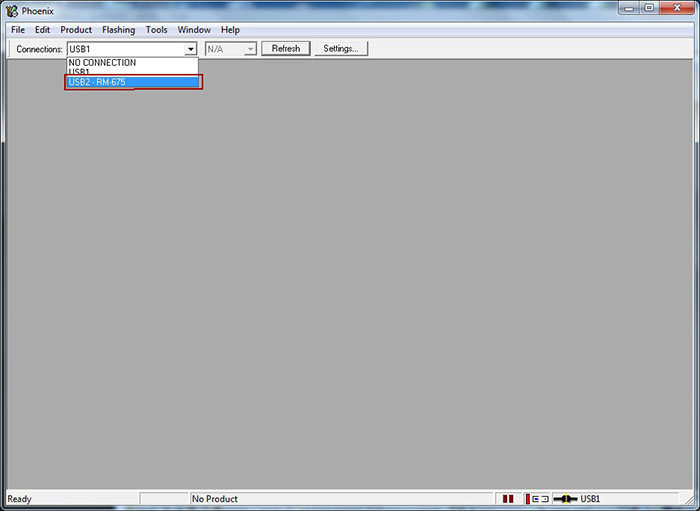
8. Select the USB port on which the phone is connected


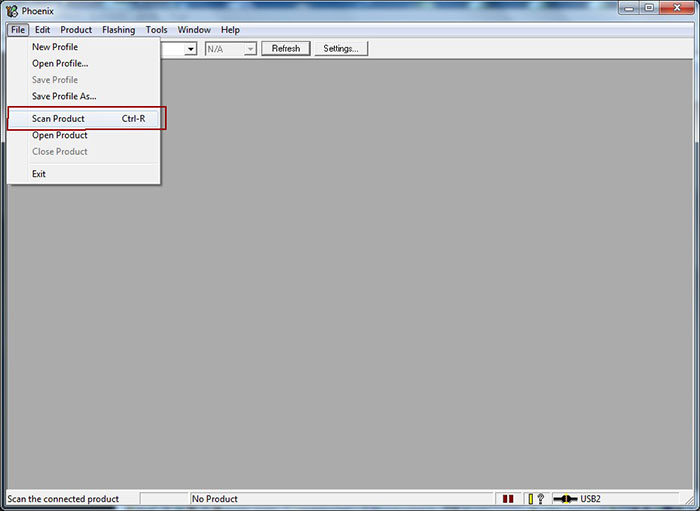
9. Click on File and select Scan Product to read phone information


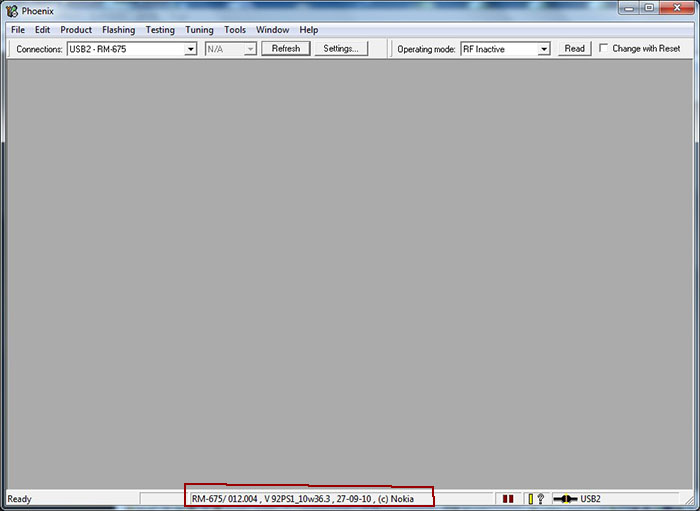
10. Your mobile phone information should be shown as shown below provided there's a working connection between your computer and mobile phone.


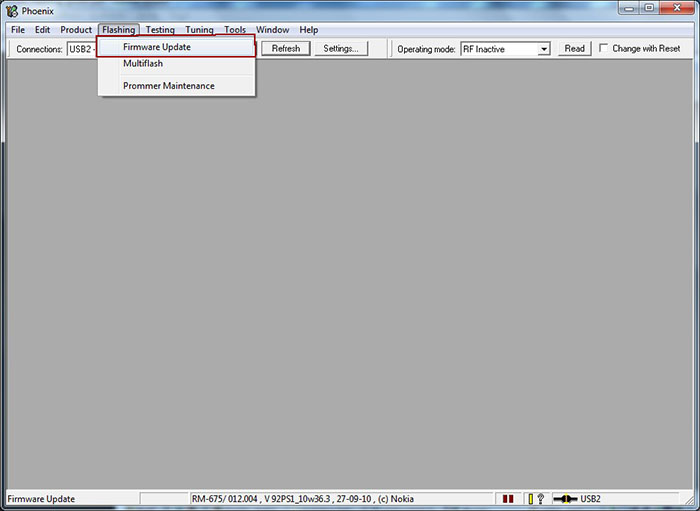
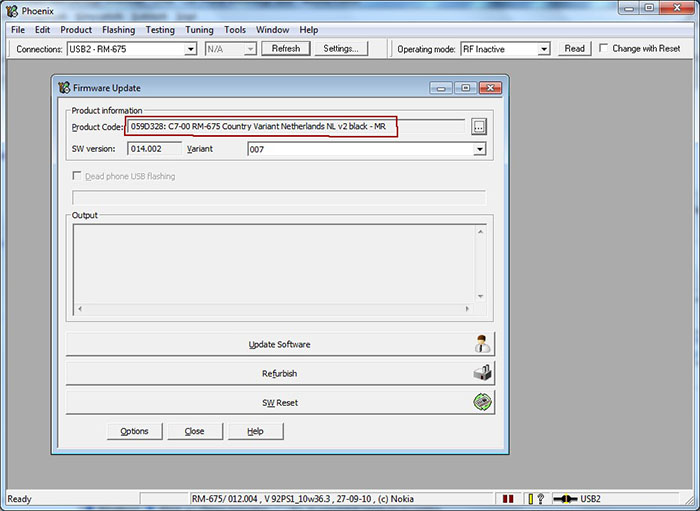
11. Click on Flashing and select Firmware Update as shown in the screenshot below


12. If you copied your firmwares to the folder cretaed in step 5, your firware files will be automatically selected.


13. Click on Update Software to start the flashing procedure. (You can click on Refurbish button only if you wish to have all user data and applications erased and phone will be reseted to factory settings.) Do not disconnect the mobile phone till the process is fully complete. The operation usually takes 2-3 minutes, when finished, a window will appear: "Firmware updating succeded.".

Flashing with Phoenix 07.jpg

14. Click OK and remove disconnect your phone from the computer. Turn on the phone and press *#0000# to check out the new firmware.


Updating your Symbian ^3 to Symbian Anna is quite an easy process but there's still that slight possibility of killing your phone through flashing though I've done it a dozen times successfully. Note that you're doing this at your own risk, not mine.

100% Uptime, Unlimited Space, Unlimited Bandwidth